<?xml version="1.0" encoding="utf-8"?><feed xmlns="http://www.w3.org/2005/Atom" ><generator uri="https://jekyllrb.com/" version="3.10.0">Jekyll</generator><link href="https://amgrubb.github.io/feed.xml" rel="self" type="application/atom+xml" /><link href="https://amgrubb.github.io/" rel="alternate" type="text/html" /><updated>2026-03-11T06:37:49-07:00</updated><id>https://amgrubb.github.io/feed.xml</id><title type="html">Alicia M. Grubb</title><subtitle>Assistant Professor, Computer Science, Smith College</subtitle><author><name>Alicia M. Grubb</name><email>amgrubb@smith.edu</email></author><entry><title type="html">Validation Station on the Pipeline of Specification Integration</title><link href="https://amgrubb.github.io/posts/2025-07-18-gitlab-pipeline" rel="alternate" type="text/html" title="Validation Station on the Pipeline of Specification Integration" /><published>2025-07-18T00:00:00-07:00</published><updated>2025-07-18T00:00:00-07:00</updated><id>https://amgrubb.github.io/posts/gitlab-pipeline</id><content type="html" xml:base="https://amgrubb.github.io/posts/2025-07-18-gitlab-pipeline"><![CDATA[<p><strong>Validation Station on the Pipeline of Specification Integration</strong><br />
<strong><em>Kika Kovaleski, Vivian Myers, Jessica Klurfeld, Karenna Kung</em></strong></p>

<p>During software development, engineers often fail to account for the original goals and stakeholder requirements of a project. Requirements engineering is the process of defining, documenting, and validating these goals. Using the GitLab Development Kit and GitLab’s Ruby on Rails codebase, we are integrating requirements as “specifications” into GitLab to help developers track overarching goals and connect them to issues and merge requests (issuables).</p>

<p>This summer, we expanded on previous work by integrating automatic code validation and implementing new features. We focused on testing our codebase using GitLab’s CI/CD pipeline to ensure it meets their quality standards for future integration. We installed and configured GitLab Runner, an application which works with GitLab CI/CD to run pipeline jobs, on a remote server. Using Docker Engine, an open source containerization technology, we were able to automatically execute these jobs in isolated, reproducible environments. Running and passing these tests allowed us to resolve critical errors and merge branches with different features, including edit, delete, and counter badges, to enable further development. This process also highlighted inconsistencies in our database, which we worked to fix by reconfiguring our initial Rails migrations and regularly testing changes using the pipeline.</p>

<p>Additionally, we added several new features to our user interface. We implemented a “content” feature, allowing specifications to have a more detailed description. We also implemented a dropdown for specifications on the “merge request” and “issues” pages to permit users to link these objects. Specifications selected in the dropdown are displayed in the sidebar. When clicked, each selected specification routes to its individual page. We implemented resource events to track who linked or unlinked specifications from issuables and when they did so. We also drafted mockups of the next feature we plan on developing: the ability to approve or deny suggested specification links.</p>

<p>Our ongoing work involves parallelizing our pipeline on a high-performance computing cluster, to allow for more efficient progress. GitLab’s CI/CD pipeline is computationally resource-intensive, making it difficult to run efficiently on our small servers. Future feature development includes an “archive” feature, permitting users to approve or deny LLM-suggested links between issuables and specifications, and deployment.</p>

<!--
<img src="/images/pc-view.png"
     alt="Screenshot of Actor view with presence conditions."
     />
-->]]></content><author><name>Alicia M. Grubb</name><email>amgrubb@smith.edu</email></author><summary type="html"><![CDATA[Kika Kovaleski, Vivian Myers, Jessica Klurfeld, Karenna Kung]]></summary></entry><entry><title type="html">Operation Specification: Extending GitLab to Incorporate Specifications</title><link href="https://amgrubb.github.io/posts/2024-07-19-gitlab-start" rel="alternate" type="text/html" title="Operation Specification: Extending GitLab to Incorporate Specifications" /><published>2024-07-19T00:00:00-07:00</published><updated>2024-07-19T00:00:00-07:00</updated><id>https://amgrubb.github.io/posts/gitlab-start</id><content type="html" xml:base="https://amgrubb.github.io/posts/2024-07-19-gitlab-start"><![CDATA[<p><strong>Operation Specification: Extending GitLab to Incorporate Specifications</strong><br />
<strong><em>Kika Kovaleski, Aline Marra, and Sydney Weisberg</em></strong></p>

<p>Requirements engineering (RE) is the process of defining, documenting, and validating users’ goals. Requirements are crucial as they guide developers towards creating products based around user needs, but they often fall through the cracks as developers fail to consider these needs throughout their development activities. GitRE will help center user requirements in software development projects by integrating requirements engineering into the development process.</p>

<p>In traditional software development, developers use version control features such as “issues” and “milestones” to track their progress towards project goals. These work well for short-term achievements but fail to account for the larger-scale goals of a project  – especially goals related to user needs. GitLab, a popular version control system built on the Git versioning system, uses these features. GitLab is an open-source platform that allows users to develop on its codebase via the GitLab Development Kit (GDK), a tool that allows users to run a local instance of GitLab. We used GDK, working in GitLab’s Ruby on Rails codebase, to add requirements specifications as first-class entities in every repository.</p>

<p>Specifically, we created an interface that integrates requirements engineering into the GitLab development process. We updated GitLab to include tabs where developers can create, delete, edit, and view specifications (i.e., requirements). These specifications can be viewed on account, project, issue, or merge request pages, and developers can search for specifications by name on account and project pages. They can be created individually, or developers can import specifications in bulk with a CSV file. Specifications can be linked to issues and merge requests so users can keep track of their progress towards fulfilling each specification. When creating or editing merge requests and issues, users can manually add these links via a dropdown.</p>

<p>Specifications are distinct from issues and milestones in that they cannot be “closed” as development progresses; they are standing goals that serve as a reminder of what the project should be able to do for users.</p>

<p>Our ongoing work involves adding options to unlink specifications from issues and merge requests, allowing users to select multiple specifications on dropdown tabs, and replacing the specification “delete” option with an “archive” option. Incorporating these features will help developers maintain a focus on users’ needs by making development with specifications more flexible and intuitive.</p>

<!--
<img src="/images/pc-view.png"
     alt="Screenshot of Actor view with presence conditions."
     />
-->]]></content><author><name>Alicia M. Grubb</name><email>amgrubb@smith.edu</email></author><summary type="html"><![CDATA[Kika Kovaleski, Aline Marra, Sydney Weisberg]]></summary></entry><entry><title type="html">On the Verge of Merge: Creating a User-friendly Merge Interface</title><link href="https://amgrubb.github.io/posts/2023-07-07-merge-interface" rel="alternate" type="text/html" title="On the Verge of Merge: Creating a User-friendly Merge Interface" /><published>2023-07-07T00:00:00-07:00</published><updated>2023-07-07T00:00:00-07:00</updated><id>https://amgrubb.github.io/posts/merge-interface</id><content type="html" xml:base="https://amgrubb.github.io/posts/2023-07-07-merge-interface"><![CDATA[<p><strong>On the Verge of Merge: Creating a User-friendly Merge Interface</strong><br />
<strong><em>Molly Daniel, Annie Karitonze, Karenna Kung, Emma Ruckle, Caroline Zouloumian</em></strong></p>

<p>BloomingLeaf is a browser-based goal modeling tool that allows users, primarily stakeholders, to model complex goals composed of numerous actors and intentions, and visualize possible satisfaction outcomes over time. Actors represent individual stakeholders or parties, and intentions represent goals, soft goals, resources, and tasks.  BloomingLeaf strives to make goal modeling simpler by providing the user building blocks and a user friendly interface. Such building blocks include draggable intentions that can be connected with varying links. BloomingLeaf differs from other goal modeling tools in its ability to project goals and their satisfaction levels over time, providing the user with a layer of automated analysis.</p>

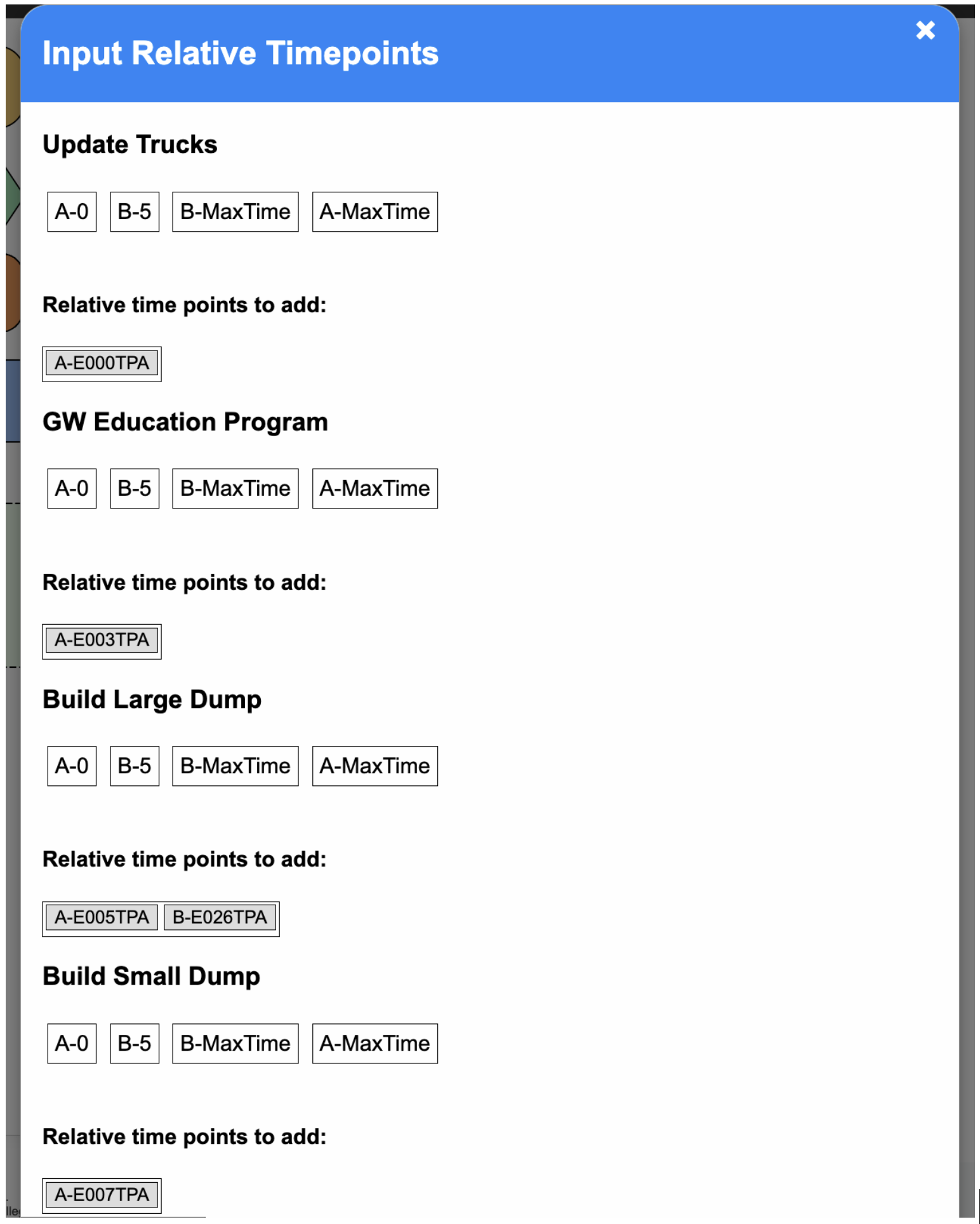
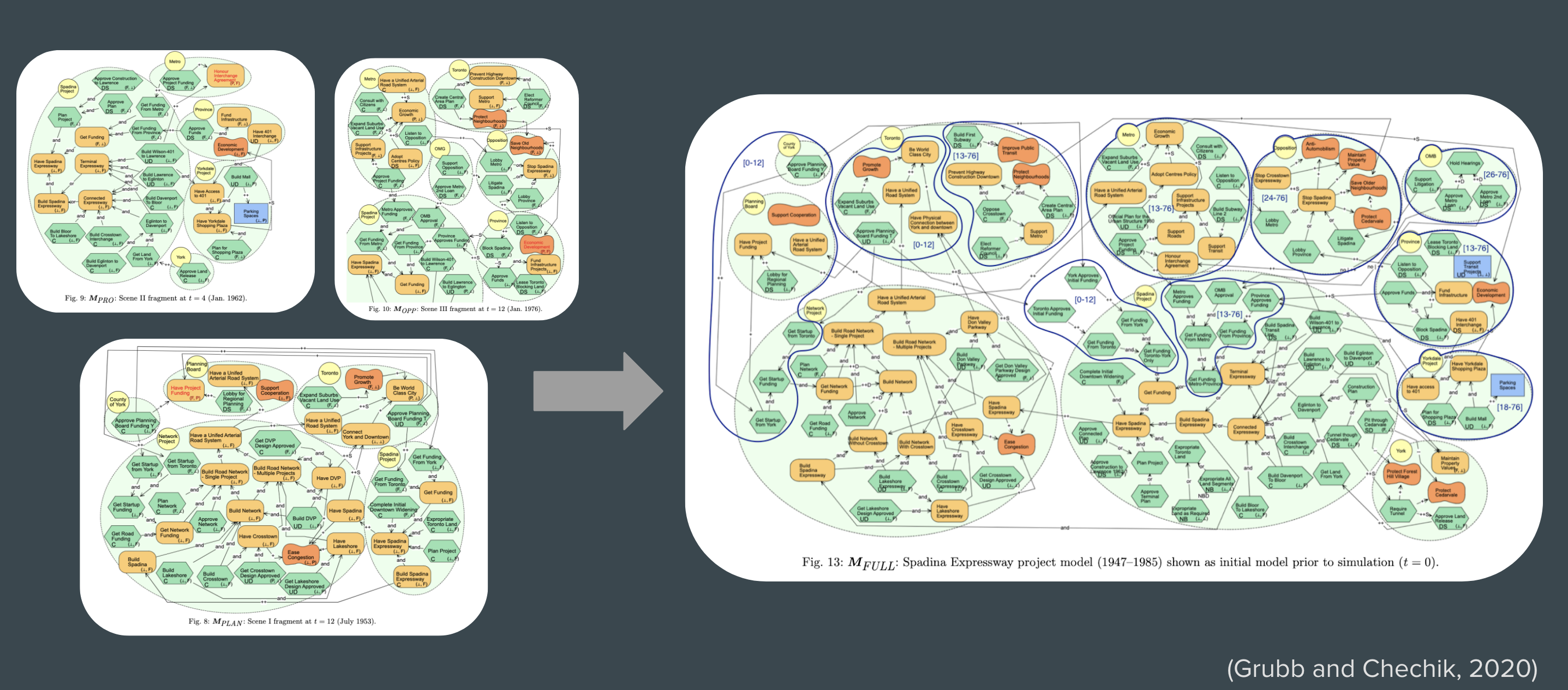
<p>BloomingLeaf gives users the ability to merge two goal models automatically. Previous work in BloomingLeaf implemented an algorithm to merge models and an initial merge option in the user interface. When models have overlapping timelines, user input may be required to complete the merging of models, but the previous version of the merge interface was unequipped to handle this, leading to merge issues.</p>

<p>We addressed this issue by revamping the merge interface, and ensuring that models could merge successfully. In the frontend, we implemented a popup to collect necessary user input on certain goal models. This popup includes draggable elements that allow the user to efficiently order and visualize the timeline of the merged model, and set time points to occur simultaneously (if they so choose). Within this user interface, we implemented multiple validation checks to retain the integrity of the original timelines. We then ensured that the correct information was being sent to and received from the backend.</p>

<p>Finally, we adjusted the merge algorithm to be able to handle simultaneous time points, as well as repeating time points which are the result of the repeat feature that can be used when creating models.</p>

<p>In future work, we will aim to account for all edge cases in order to finalize the merge interface and to guarantee that it works end to end for all models.</p>

<p><img src="/images/merge-timepoints-view.png" alt="Screenshot of the time points view for the Merge interface." /></p>]]></content><author><name>Alicia M. Grubb</name><email>amgrubb@smith.edu</email></author><summary type="html"><![CDATA[Molly Daniel, Annie Karitonze, Karenna Kung, Emma Ruckle, Caroline Zouloumian]]></summary></entry><entry><title type="html">Slide to Hide: Allowing Users to Specify Elements’ Presence Intervals</title><link href="https://amgrubb.github.io/posts/2023-07-07-presence-interface" rel="alternate" type="text/html" title="Slide to Hide: Allowing Users to Specify Elements’ Presence Intervals" /><published>2023-07-07T00:00:00-07:00</published><updated>2023-07-07T00:00:00-07:00</updated><id>https://amgrubb.github.io/posts/presence-interface</id><content type="html" xml:base="https://amgrubb.github.io/posts/2023-07-07-presence-interface"><![CDATA[<p><strong>Slide to Hide: Allowing Users to Specify Elements’ Presence Intervals</strong><br />
<strong><em>Xinran Bi, Emily Kung, Karenna Kung, Caroline Zouloumian</em></strong></p>

<p>BloomingLeaf is a tool used to create and analyze Tropos goal models. The elements of a model are actors, intentions, and links. Actors’ desires are expressed as intentions, and intentions can be linked together with different types of relationships. We can simulate possible paths of how satisfaction values change over time for each intention, while taking into consideration the constraints on an intention’s satisfaction values and its relationships to other intentions.</p>

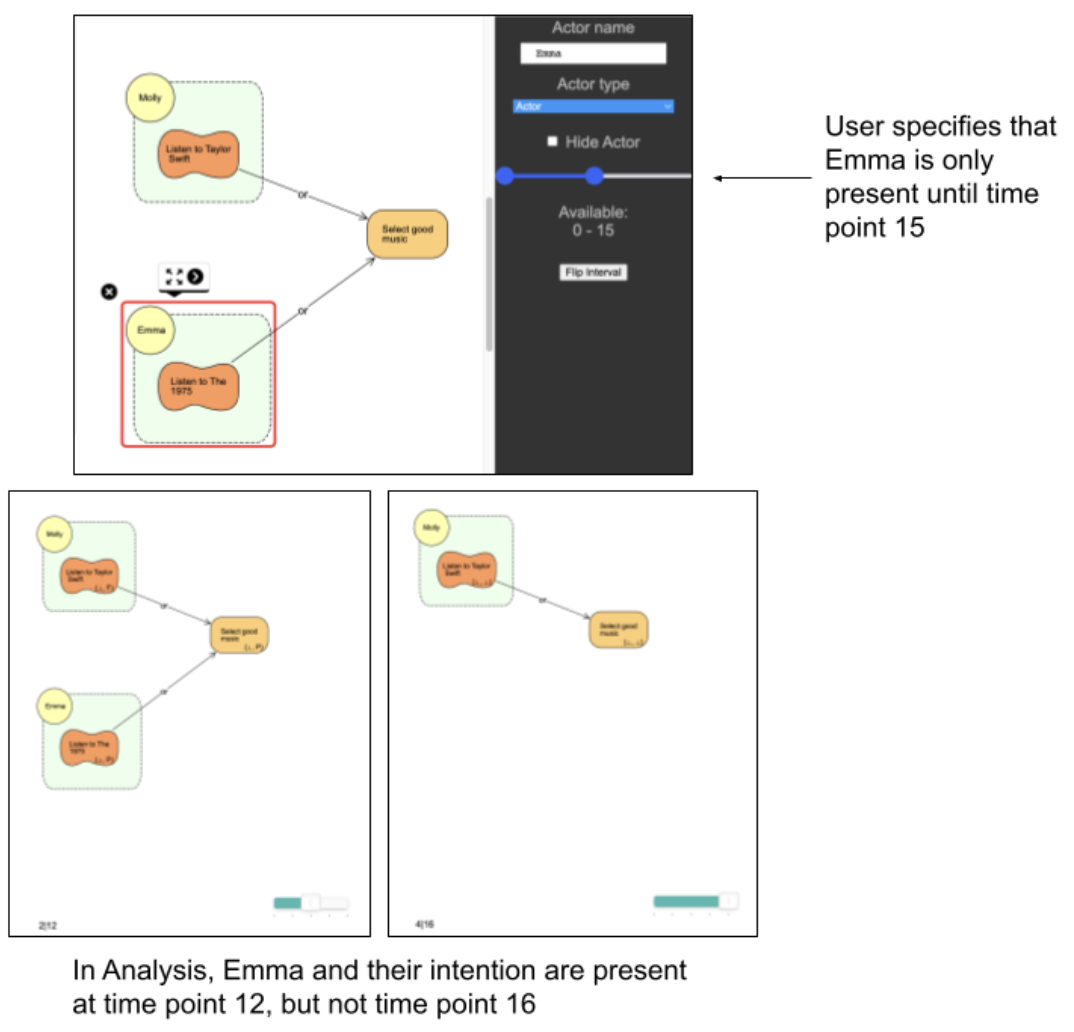
<p>Sometimes, an element of the model is not present during the entire timeline. For example, let’s imagine Molly is driving Emma home. They want to choose music that fits both of their tastes. Molly loves Taylor Swift, while Emma wants to listen to The 1975. Once Emma is dropped off, Molly doesn’t have to consider Emma’s wish for The 1975 anymore and can take it off the playlist. The actor representing Emma is not present during the whole car ride, so their music tastes only need to be considered for part of the car ride. This scenario demonstrates the need for presence conditions. We aimed to create a front-facing interface so that a user could specify that an actor or intention appears part way through the time period, disappears part way through the time period, or disappears and later reappears during the time period.</p>

<p>To this end, we updated the tool such that, upon clicking on an actor or intention, the inspector window includes a slider with two sliding values representative of time points between the minimum and maximum times of the model. The user can use the sliding points to specify the start and end values of a time interval, and can click a checkbox to indicate whether they are specifying an inclusion or exclusion interval. Additionally, both slider limits and the stored intervals change according to the maximum range available to the actor or intention. Intentions belonging to an actor cannot be present while their actor is not, and neither actors nor intentions can exist outside of time point 0 and the maximum time point. The list of exclusion intervals for all intentions is also viewable in the Assignments Table tab of the tool. From this view, the user can also add or delete excluded intervals.</p>

<p>After setting the intervals using the sliders, when the user simulates a path, actors, intentions, and their links do not appear at time points that are within their exclusion intervals, enabling the user to envision only the relations in the model that are relevant at the given time point.</p>

<p>Future work may include considering presence conditions in the Next State feature. This feature allows the user to choose specific satisfaction values for each intention at a certain time point, so incorporating presence conditions would mean that the user can only select satisfaction values for intentions that are present at the given time point.</p>

<p><img src="/images/pc-view.png" alt="Screenshot of Actor view with presence conditions." /></p>]]></content><author><name>Alicia M. Grubb</name><email>amgrubb@smith.edu</email></author><summary type="html"><![CDATA[Xinran Bi, Emily Kung, Karenna Kung, Caroline Zouloumian]]></summary></entry><entry><title type="html">Thesis: Aiding Users in Requirements Analysis Tasks Through Color and Filtering</title><link href="https://amgrubb.github.io/posts/2023-05-01-thesis-baatartogtokh" rel="alternate" type="text/html" title="Thesis: Aiding Users in Requirements Analysis Tasks Through Color and Filtering" /><published>2023-05-01T00:00:00-07:00</published><updated>2023-05-01T00:00:00-07:00</updated><id>https://amgrubb.github.io/posts/thesis-baatartogtokh</id><content type="html" xml:base="https://amgrubb.github.io/posts/2023-05-01-thesis-baatartogtokh"><![CDATA[<p><strong>Aiding Users in Requirements Analysis Tasks Through Color and Filtering</strong><br />
<strong><em>Senior Honors Thesis by Yesugen Baatartogtokh</em></strong></p>

<blockquote>
  <p><em>Thesis Abstract:</em>

Goal-oriented requirements engineering (GORE) allows stakeholders to visualize project scenarios and evaluate their changes over time, which assists them in making early trade-off decisions. However, goal models use formal notation that raises stakeholder concerns about comprehension when evaluating a model’s evolution over time or exploring other potential solutions. This thesis aims to assist users in interpreting the results of automated analysis in answering time-based questions over goal models. To do so, we validate a previous approach that uses color visualization to improve model comprehension, extend it to assist users in exploring alternate scenarios, and implement filtering to allow stakeholders to interpret models and generate their own scenarios.</p>
</blockquote>]]></content><author><name>Alicia M. Grubb</name><email>amgrubb@smith.edu</email></author><summary type="html"><![CDATA[Yesugen Baatartogtokh]]></summary></entry><entry><title type="html">Thesis: What Makes a Requirement?: Towards Distinguishing Software Requirements from Generic Text</title><link href="https://amgrubb.github.io/posts/2023-05-01-thesis-yeutseyeva" rel="alternate" type="text/html" title="Thesis: What Makes a Requirement?: Towards Distinguishing Software Requirements from Generic Text" /><published>2023-05-01T00:00:00-07:00</published><updated>2023-05-01T00:00:00-07:00</updated><id>https://amgrubb.github.io/posts/thesis-yeutseyeva</id><content type="html" xml:base="https://amgrubb.github.io/posts/2023-05-01-thesis-yeutseyeva"><![CDATA[<p><strong>What Makes a Requirement?: Towards Distinguishing Software Requirements from Generic Text</strong><br />
<strong><em>Senior Honors Thesis by Sasha Yeutseyeva</em></strong></p>

<blockquote>
  <p><em>Thesis Abstract:</em>
Requirements engineering is the practice of identifying and managing requirements during the software engineering process. These requirements are identified and stored in natural language documents called Software Requirements Specification (SRS) documents, which also contain other information about the software project. Requirements are written in a variety of requirements notations, for example natural language and EARS. As SRS documents grow to be very long or become unstructured, it becomes harder for humans to identify requirements within them. As a result, it would be ideal to have the ability to extract only the requirements out of SRS documents written in natural language. To distinguish requirements among natural language, Natural Language Processing (NLP) techniques must be used. This thesis explores the research question of identifying requirements among natural language and conducts a literature survey of existing relevant techniques. We build off existing state of the art and present our initial system, ReqSpotter, that identifies sentence long requirements among natural language.</p>
</blockquote>]]></content><author><name>Alicia M. Grubb</name><email>amgrubb@smith.edu</email></author><summary type="html"><![CDATA[Sasha Yeutseyeva]]></summary></entry><entry><title type="html">Evaluation Visualization Overlay (EVO): A User Validation Study</title><link href="https://amgrubb.github.io/posts/2022-08-02-evo-study" rel="alternate" type="text/html" title="Evaluation Visualization Overlay (EVO): A User Validation Study" /><published>2022-08-03T00:00:00-07:00</published><updated>2022-08-03T00:00:00-07:00</updated><id>https://amgrubb.github.io/posts/evo-study</id><content type="html" xml:base="https://amgrubb.github.io/posts/2022-08-02-evo-study"><![CDATA[<p><strong>Evaluation Visualization Overlay (EVO): A User Validation Study</strong><br />
<strong><em>2022 SURF Abstract by Yesugen Baatartogtokh, Irene Foster, Joey Elsbernd</em></strong></p>

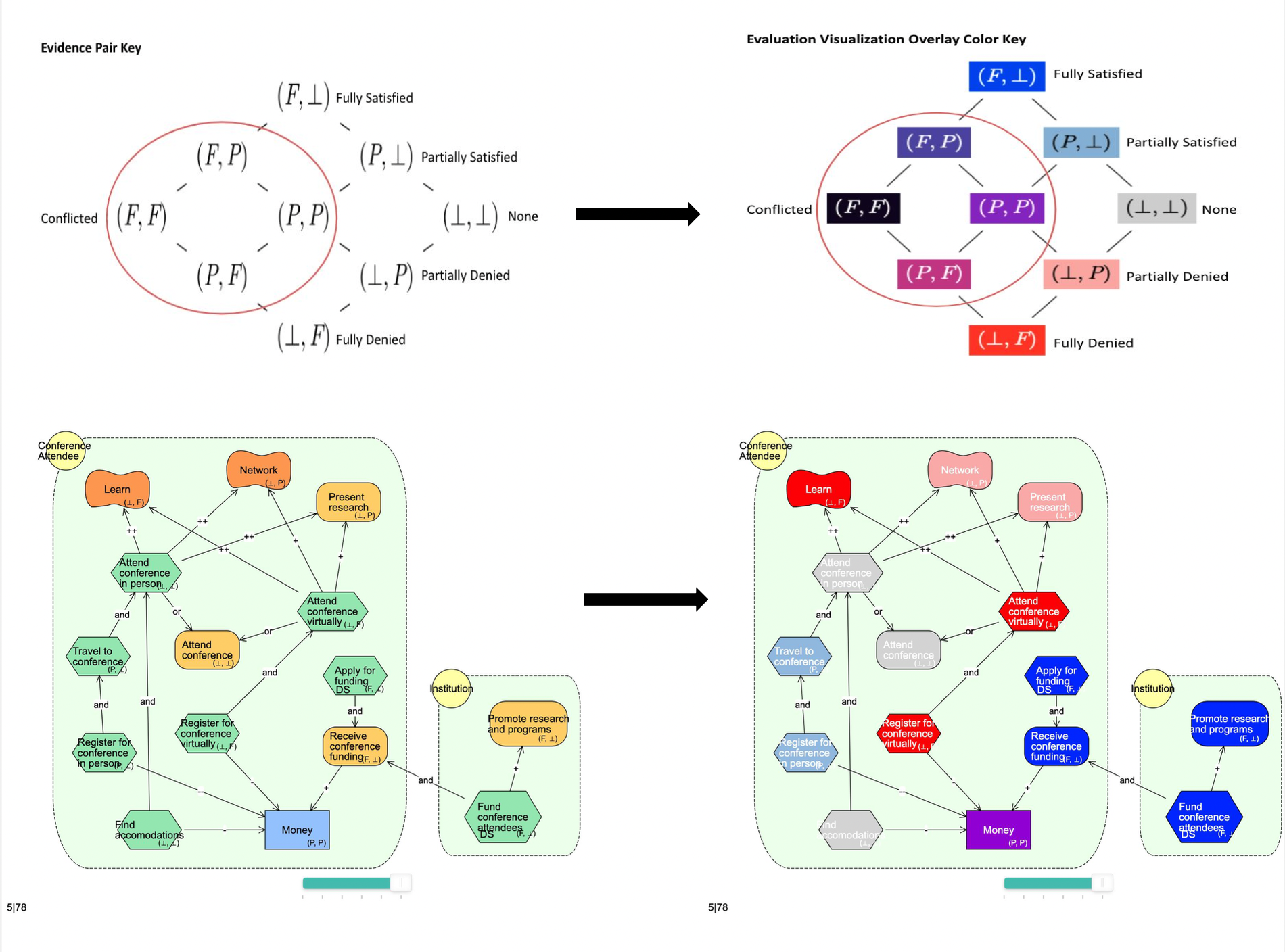
<p>BloomingLeaf is a web-based tool that allows users to model and analyze goals that evolve over time. These models consist of actors, links, and intentions that have function types and satisfaction values, which are also known as evidence pairs. By evaluating the changes in intentions over time through path analysis, users are better able to understand future project evolutions. However, running a path analysis means that each intention in the model contains evaluation information for each time point of the path. This information is difficult for the user to remember, which makes decision-making complicated.</p>

<p>Previous work in BloomingLeaf implemented Evaluation Visualization Overlay (EVO) as a feature that  assigns each evidence pair a color. In BloomingLeaf’s Modeling mode EVO colors the intentions that have evidence pairs according to the color key. In Analysis view has three mode options: Percent, Time, and State. State mode allows the user to step through each time point in the path with the intentions colored according to their satisfaction value. In Time mode, the intentions are striped chronologically with each color representing a different time point, allowing the user to see the evolution of the model over time at a glance. Percent mode colors the intentions with the percentage of time it has a specific satisfaction value, showing the values according to proportion.</p>

<p>To validate that adding EVO assists users in their model understanding and allows for better and faster decision making, we developed a between-subjects user study that will be taken online. Our research questions are:
RQ0: Do modelers perform similarly on understanding tests, given a consistent training protocol	
RQ1: How does EVO affect modeler’s understanding and comprehension of goal models	
RQ2: How does EVO affect the speed at which a modeler understands a goal model</p>

<p>RQ1 has understanding and comprehension being broken down into the ability to interpret, exemplify, classify, summarize, infer, and compare. RQ2 looks at the time it took subjects with and without EVO to answer our questions.
This summer, we explored empirical methods of evaluation and created our study design. Additionally, we prepared study materials (including videos) and tested these materials with others in the lab.
We intent to run our study this fall, which will allow us to validate the usefulness of EVO for users.</p>

<p><img src="/images/evo-study.png" alt="Evo Study Demonstration" /></p>]]></content><author><name>Alicia M. Grubb</name><email>amgrubb@smith.edu</email></author><summary type="html"><![CDATA[Yesugen Baatartogtokh, Irene Foster, Joey Elsbernd]]></summary></entry><entry><title type="html">Matching Software Requirements to Git Artifacts</title><link href="https://amgrubb.github.io/posts/2022-08-03-gitre" rel="alternate" type="text/html" title="Matching Software Requirements to Git Artifacts" /><published>2022-08-03T00:00:00-07:00</published><updated>2022-08-03T00:00:00-07:00</updated><id>https://amgrubb.github.io/posts/gitre</id><content type="html" xml:base="https://amgrubb.github.io/posts/2022-08-03-gitre"><![CDATA[<p><strong>Matching Software Requirements to Git Artifacts</strong><br />
<strong><em>2022 SURF Abstract by Sonora Halili, Anisha Jain, and Joey Elsbernd</em></strong></p>

<p>Imagine leaving a dinner party hungry. Although your friend took note of each guest’s dietary needs, they failed to account for each of them while grocery shopping, unintentionally leaving you with no options. Now imagine a tool that could remind your friend after each purchase that you can’t have gluten, and that your other friend can’t have dairy, or that your other friend is vegetarian. This would narrow down the recipe options for the host. They’d need to decide whether it’s worth cooking three separate meals or one complex dish instead. Eventually, the decision would have to please everyone.</p>

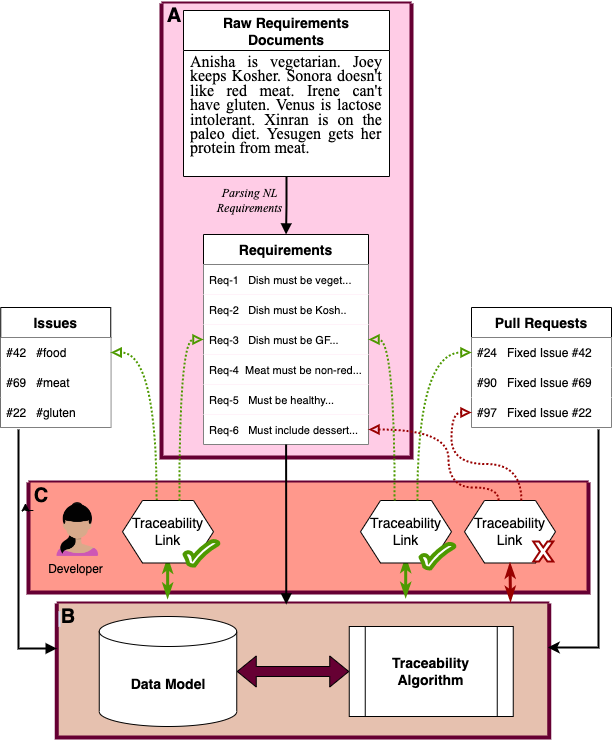
<p>Software development is our favorite dinner party. There may be many cooks and many recipes, but it is of utmost importance that everyone gets to eat. The dietary specifications of software development are requirements––clear-cut expectations for the final product. Requirements Management (RM) refines the coding workflow, yielding quality bespoke software. RM techniques include creating traceability links between requirements and development artifacts (i.e., issues and pull requests), an often costly task that developers are reluctant to invest in. Completing this process manually is tedious and time-consuming, given that even small and medium-scale projects come with hundreds of requirements. In this project, we investigated the feasibility of creating a lightweight, open-source, Git-based tool that can complete the mapping process semi-automatically, reducing both the time and monetary cost of fully integrating RM.</p>

<p>Our proposed tool will take in requirements in natural language (plain text), map them to existing Git artifacts (issues and pull requests) through Natural Language Processing (NLP), and prompt the user to select among the suggested traceability links. It will function iteratively, allowing the user to update and add links at all stages of the development process. The Git development environment is ubiquitous for small and medium sized companies, so hosting our solution through existing Git infrastructure will make RM more accessible in the software development community.</p>

<p>We explored cloud-based Git repository websites (GitHub, BitBucket, GitLab) and chose to extend the GitLab interface, given that it is open-source and comes with a barebones requirements feature. Additionally, Smith College Computing and Technical Services (CATS) runs a local version of GitLab and agreed to host our improvements. In future works, we will continue to research NLP techniques and Deep Learning techniques for connecting requirements with Git artifacts.</p>

<p><img src="/images/gitre.png" alt="Model for Proposed Tool" /></p>]]></content><author><name>Alicia M. Grubb</name><email>amgrubb@smith.edu</email></author><summary type="html"><![CDATA[Sonora Halili, Anisha Jain, and Joey Elsbernd]]></summary></entry><entry><title type="html">Presence Conditions Within BloomingLeaf Tool</title><link href="https://amgrubb.github.io/posts/2022-08-02-presence-conditions" rel="alternate" type="text/html" title="Presence Conditions Within BloomingLeaf Tool" /><published>2022-08-03T00:00:00-07:00</published><updated>2022-08-03T00:00:00-07:00</updated><id>https://amgrubb.github.io/posts/presence-conditions</id><content type="html" xml:base="https://amgrubb.github.io/posts/2022-08-02-presence-conditions"><![CDATA[<p><strong>Presence Conditions Within BloomingLeaf Tool</strong><br />
<strong><em>2022 SURF Abstract by Venus Nguyen and Xinran Bi</em></strong></p>

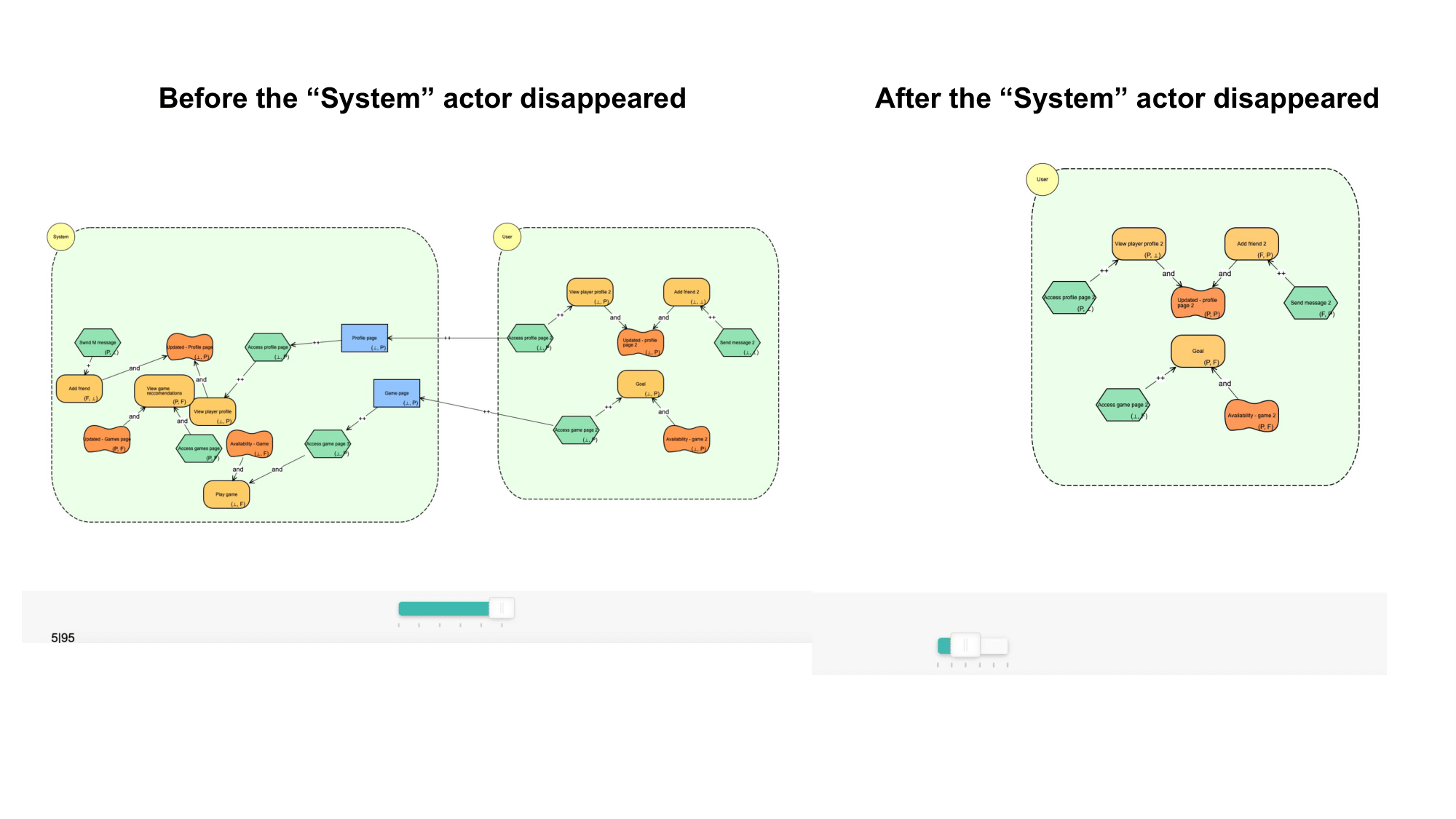
<p>We introduced presence conditions in BloomingLeaf to visualize changes within the goal model’s evolution. BloomingLeaf is an analysis and modeling tool that allows users to model goals that evolve over time. These models consist of intentions, actors, and links. By evaluating the changes in intentions over time, users are better able to understand future project evolutions and make decisions from them. A presence condition states whether a model element (i.e., intention or actor) exists at a particular time point in the project’s evolution.</p>

<p>We first determined how to make an intention invisible. The “element ID” in each intention allowed us to change the visibility of each intention, so we successfully made intentions disappear in the CSS code. We then identified intentions with their IDs and have them stored automatically from the given goal models.</p>

<p>Next, we started looking through the front-end code and testing out possibilities of getting intentions within our model to disappear on a time-based condition. Once a user simulates a goal model within the analysis window, BloomingLeaf creates a path of timepoints that shows the progress of a goal model through a set span of time. At each timepoint the Satisfaction value of each intention changes. Users are able to step through each time point and examine the current state of the model with the use of a slider. We tested the disappearance of intentions based on satisfaction values to allow the visibility of elements more reliant on the prebuilt attributes. Satisfaction values are values assigned to intentions indicating whether the intentions are satisfied or denied within the evolutions of the model. Ultimately, we validated we could make intentions appear or disappear with the given satisfaction values.</p>

<p>We then grouped actors and all the intentions within it to change the visibility of elements on the actor-level instead of a single intention. We found a list of actors containing their embedded elements (intentions and links) to make a specific actor disappear with all its embedded elements. In future work, we hope to implement presence conditions with Actors.</p>

<p><img src="/images/presence-conditions.png" alt="Presence Conditions Demonstration" /></p>]]></content><author><name>Alicia M. Grubb</name><email>amgrubb@smith.edu</email></author><summary type="html"><![CDATA[Venus Nguyen, Xinran Bi]]></summary></entry><entry><title type="html">All the International Color Palettes You Could’ve I-magenta-ed</title><link href="https://amgrubb.github.io/posts/2022-08-02-evo-colors" rel="alternate" type="text/html" title="All the International Color Palettes You Could’ve I-magenta-ed" /><published>2022-08-02T00:00:00-07:00</published><updated>2022-08-02T00:00:00-07:00</updated><id>https://amgrubb.github.io/posts/evo-colors</id><content type="html" xml:base="https://amgrubb.github.io/posts/2022-08-02-evo-colors"><![CDATA[<p><strong>All the International Color Palettes You Could’ve I-magenta-ed</strong><br />
<strong><em>Catherine Kung, Sonora Halili, Yanning Tan, Cyrine Ben Ayed</em></strong></p>

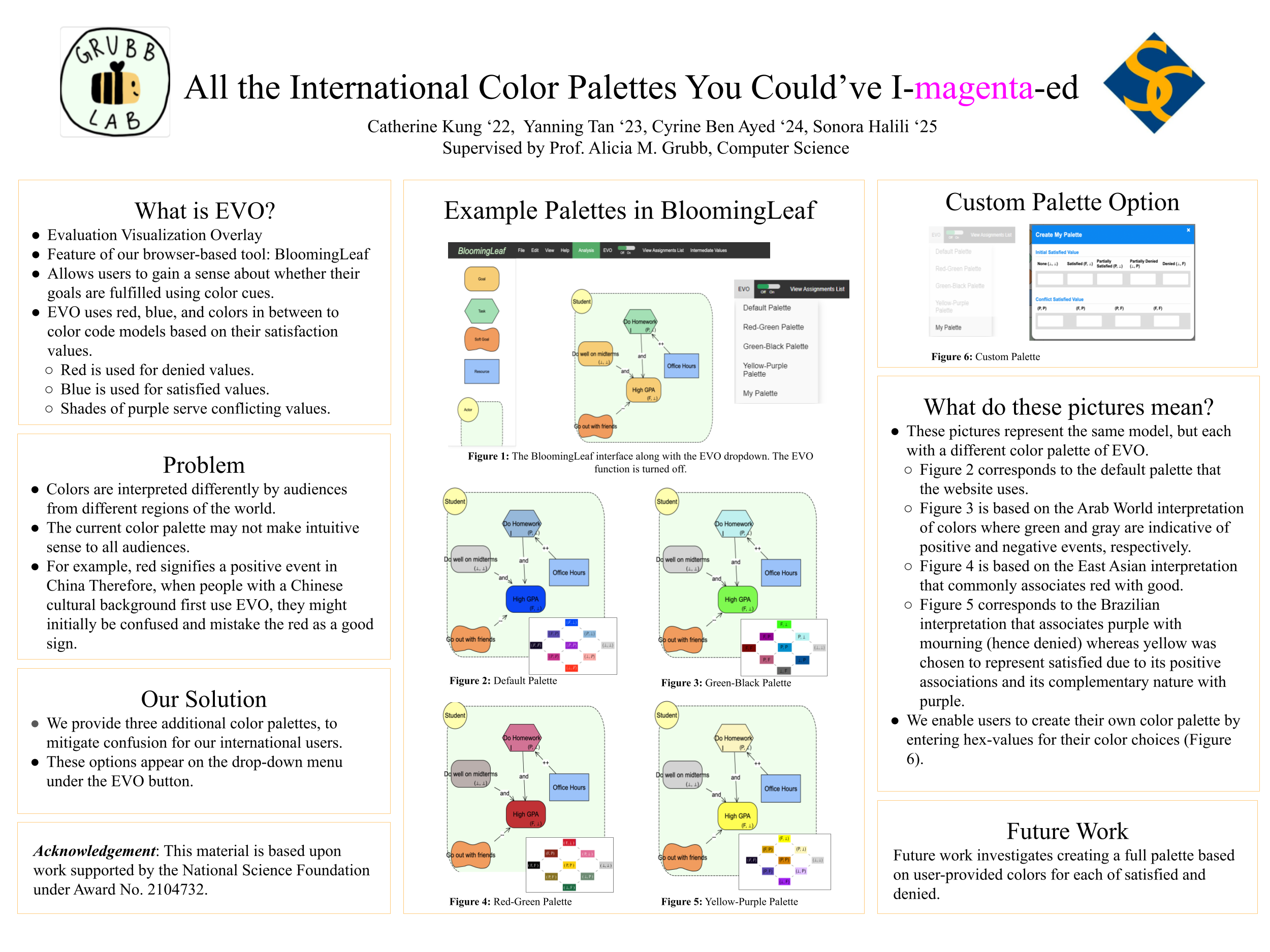
<p>Evolution over time is a key feature of goal models. It is important for users to be able to quickly comprehend these changes over time. The Evaluation Visualization Overlay (EVO) tool in BloomingLeaf allows users to see the evolution of their goals’ satisfaction values over time through the use of colors.</p>

<p>The existing color palette that BloomingLeaf used presented most satisfied goals with blue, and least satisfied ones with red. Partially satisfied and none values varied between purple and shades of gray. However, we concluded that this palette could be confusing and misleading to international audiences, given different interpretations and connotations of certain colors, so we implemented an additional three palettes to make goal models more readable to these audiences. We also added a feature that allows the user to input their own color preferences for each satisfaction value, thus creating a personalized palette that works best for their color interpretations.</p>

<p><img src="/images/evo-color.png" alt="Collaborations Poster for EVO Color Project" /></p>]]></content><author><name>Alicia M. Grubb</name><email>amgrubb@smith.edu</email></author><summary type="html"><![CDATA[Catherine Kung, Sonora Halili, Yanning Tan, Cyrine Ben Ayed]]></summary></entry></feed>